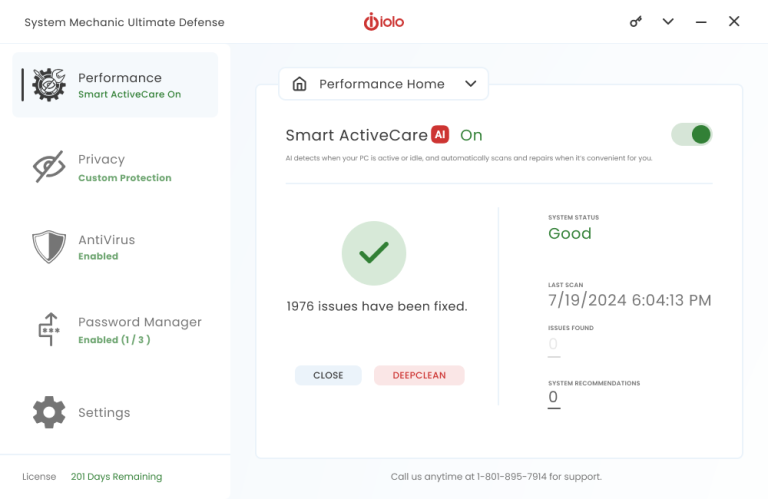
Get the most comprehensive diagnosis available
Most PCs accumulate
new problems each day that impact performance, reliability, and security.
With a click, run hundreds of tests to fully identify every issue, and get a complete
diagnosis with recommended repairs from System Mechanic's Dashboard.
Dashboard view
- Easy to understand system overview
- Quick or Deep analysis options
- Comprehensive status gauge
- Clear explanation of each problem
- Straightforward actions to fix all problems or only those you want
Intelligence-driven with Tune-up Definitions™
System Mechanic literally gets smarter the longer you use it, because regularly
delivered Tune-up Definitions™ provide the expert knowledge to precision-tune
your PC using the latest up-to-date scientific research released from iolo Labs.
Learn more
Flexible Quick or Deep analysis options
The re-optimized scan engine in System Mechanic 9 runs faster and is exponentially
more effective than ever -- even uncovering previously unknown core problems
in Windows 7, Vista, and XP that can lead to eventual PC clogging, slowdowns, and
failures.
From the Dashboard, launch a Quick analysis to check for the most common problems
in less than a minute, or choose the Deep analysis to perform a complete battery
of hundreds of tests that uncover every possible issue affecting your
PC's performance, reliability, or security:
- Registry errors and fragmentation
- Unnecessary startup programs
- Dangerous startup programs
- Hard drive errors and fragmentation
- Excessive system clutter
- Broken shortcuts
- Unoptimized internet speed settings
- Security vulnerabilities
- Antivirus and firewall issues
- Old or missing registry backups
...plus dozens more problems that can bring your PC down.
View and address problems
Analysis results are concisely presented and easy to understand. You can let System
Mechanic safely fix everything with just one click of the Repair All button,
optionally exclude items from repair, or even drill down to gain further insight
and enable targeted repairs.
Too busy to scan and repair? Automate it all with ActiveCare®
I feel incredibly safe when surfing the web in the knowledge that iolo is in the
background protecting my PC. - John W., Brahma Lodge, AU
Effortlessly keeps your PC running like new
Why interrupt your routine
to periodically launch PC maintenance and repair tools?
Patent-pending ActiveCare® maintains PC health by monitoring performance behind-the-scenes
and automatically fixing problems when your PC is on but not in use.
Automated tasks
Enable as many ActiveCare
automated tasks as you like
- Turbocharge Windows startup
- Repair registry problems
- Repair registry fragmentation
- Compact registry bloat
- Clean up excessive system clutter
- Repair hard drive errors
- Repair security vulnerabilities
- Optimize internet connection
- Defragment all hard drives
- Defragment system memory
- Repair broken shortcuts
- Back up the registry
How patent-pending ActiveCare® technology beats scheduled tools
Idle-time processing - Only ActiveCare's patent-pending technology
can truly detect when your PC isn't being used, so it never interrupts you while
you're working or playing. It even stays out of your way when you're watching movies
or listening to music!
ZeroRAM™ technology - ActiveCare is designed to virtually
disappear from memory when it is not running, thereby never impacting your system
performance by having it turned on.
Efficient Operation - ActiveCare only performs repairs and optimizations
are specifically needed by the PC at the time it runs. It never wastes time "going
through the motions" like ordinary schedulers that can spend hours performing operations
that aren't even required, simply because they were scheduled.
You can customize ActiveCare
Additional configurations allow you to fully customize when ActiveCare runs - you
can control ActiveCare processing based on scheduled times, battery power usage,
CPU usage, full screen mode for gaming/videos and more.
Receive optional status reports
Web-based ActiveCare reports summarize your PC's status over a specific time period.
You can see what optimizations and repairs System Mechanic has performed and track
changes to your PC's health and security. This is particularly handy for the "family
PC guru" or sysadmin to keep up-to-date on the status of all the PCs you manage.
|
TIP: Use the new PC
Health Status Gadget for Windows 7 and Vista to get instant readings of critical
PC Health and system status right on your desktop.
|
Fantastic product.... Saves me from having to maintain my PC. Many thanks.
- Rik B., Sunderland, UK
All-in-one and individual tools at your fingertips
Some "cleaner" utilities are
way too complicated, while others perform reckless actions without precise control.
System Mechanic's toolbox gives you the right solution for your situation, whether
it requires a precision repair or an all-in-one wizard that fixes many problems
at once.
All-in-one tools
Total Registry Revitalizer™ NEW
The powerful all-in-one solution for keeping your registry clean, organized, and
free of errors in four critical steps: Backup, Repair, Defragment and Compact.
Learn more about this and
other new features
PC TotalCare™
Combines four all-in-one wizards to carry out multiple diagnostic, repair, cleanup,
and security tasks at once under one powerful and easy-to-use wizard.
Over
40
individual tools
Not just for power users and experts, these individual System Mechanic tools are
easy to use.
Even more powerful and useful tools, all included...
I love your product. It's not only a great product, but it's fun to use. Sometimes
I just play with the different categories and I just enjoy myself… -Ray H., Brooklyn,
New York
Easy access to the heartbeat of your PC
Even experienced PC users
have trouble knowing exactly what's running under the hood and why.
System Mechanic's IntelliStatus™ provides everything you need to know at a
glance, plus you can drill down for detailed plain-English explanations.
IntelliStatus®
Understand and manage aspects of your PC that affect performance.
- Startup programs
- Running programs
- System memory
- Hard drive status
- Internet speed
With System Mechanic, you never have to wonder what's running and why.
Comprehensive system status
IntelliStatus provides important system information visually and in real-time. It
displays comprehensive system statistics that allow you to track your computer's
performance and analyze potential threats to PC health, locate performance bottlenecks,
know if any unknown or unauthorized programs are running, and much more.

Configure and manage startup and running processes
Monitor hard drive status
DriveSense™ provides real-time data about the status of your hard drive, including
drive temperature and other indicators of drive reliability. To retrieve diagnostic
information from your hard drives, DriveSense uses SMART technology, an industry-accepted
standard for detecting potential drive problems.

Stay informed of pending hard drive issues
Reports and more
System Mechanic's report history provides a complete running total of problems repaired,
drive space freed of clutter, and other important information to keep you abreast
of all the optimizations occurring in your PC.
The amount of information and control System Mechanic makes available is virtually
unlimited, with over 40 tools at your service!
See what's new in System Mechanic 9
I love your product. It's not only a great product, but it's fun to use. Sometimes
I just play with the different categories and I just enjoy myself… -Ray H., Brooklyn,
New York
Welcome to the Next Generation of PC Tune-up
|
|
|
Newly expanded Tune-up Definitions with weekly updates from iolo Labs literally
make System Mechanic 9 more effective the longer it is used.
|
System Mechanic 9 arrives with a comprehensive set of significant speed improvements
throughout the product to push the performance envelope.
|
Previously unknown Windows 7/Vista/XP core problem areas are now covered, making
System Mechanic 9 exponentially more effective.
|
Download Feature Overview (PDF)
|
|
|
|
Several exciting new tools add even more tune-up power
PC Health Status Gadget NEW
The PC Health Status Gadget offers an at-a-glance overview of your PC's health status
- right on your desktop.
Provides real-time reports on system health, security, and overall status. Includes
a running list of recently performed repairs and optimizations, and offers quick
access to commonly used tools, such as Memory Mechanic® and the new EnergyBooster™.
EnergyBooster™ NEW
Boost speed by turning off unused background programs.
Perfect for gamers, video and sound engineers, artists, web designers... or
any serious computer user who requires raw, fast performance -- instantly.
Frees up system memory and CPU resources to give Windows additional horsepower.
Uses iolo Labs' Tune-up Definitions and user-defined profiles to identify background
programs and services that can be temporarily shut down.
Total Registry Revitalizer™ NEW
Repair, compact, defragment, and backup your Windows registry in one step.
Integrates all of System Mechanic's powerful registry tools to provide complete
and seamless all-in-one care for the Windows registry, performing the
entire battery of critical repair, maintenance, and optimization procedures in one
step. This tool also leverages System Mechanic's dramatically improved technology
with up to 5 times higher problem-detection rate, improved overall speed and efficiency
of scans, and enhanced reporting that provides more detailed scope of errors.
Incinerator® for Recycle Bin NEW
Permanently wipes files in the Windows Recycle Bin, so they can never be recovered.
Incinerator® technology is now integrated into the Windows Recycle Bin, providing
you with the choice of standard file deletion or the Department of Defense 5220-22M
compliant technique for maximum security when emptying the Recycle Bin.
Tune-up Definitions™ NEW

Makes System Mechanic® significantly more effective (and safer) than other PC
tune-up products.
Tune-up Definitions give System Mechanic the expert knowledge to precision-tune
your PC using the latest up-to-date scientific research released from
iolo Labs. The product literally gets smarter and more effective
the longer you use it. Learn more
Plus, many tools have substantially enhanced functionality
See more enhanced features
Download System Mechanic 9 Feature Overview (PDF)
Many tools with substantially enhanced functionality
Startup Optimizer™ ENHANCED
Start Windows significantly faster by eliminating unneeded or malicious start up
programs.
The vastly expanded knowledgebase of Tune-up Definitions that includes thousands
of new programs and services researched by iolo Labs makes the Startup
Optimizer tool reduce Windows boot times like never before.
Memory Mechanic® ENHANCED

Instantly defragments RAM and liberates resources held captive by memory leaks.
System Mechanic's Memory Defragmentation tool is designed not only to reassemble
your RAM into neat, contiguous order for significant performance gains, but also
to hunt down and release all of the resources held captive by memory leaks within
sloppy programs. It's been reengineered to work up to 85% faster
and to find and eliminate up to 25% more memory leaks, providing
more performance than ever.
Privacy Cleaner™ ENHANCED
Securely wipes away all traces of your personal and confidential computer activity.
Better than "clearing the cache," it uses military-grade Incinerator®
data shredding technology to safely and permanently whisk away the trail
of activity left in over 45 locations by Windows, web browsers, media players, and
more.
Now with dozens of additional cleanup targets including all major
web browsers and chat clients:
|
• Internet Explorer
|
• Firefox
|
• AIM
|
• MSN
|
|
• Google Chrome
|
• Safari
|
• Yahoo
|
• Skype
|
|
|
|
|
• More...
|
Registry Tuner ENHANCED

Based on extensive research from iolo Labs, System Mechanic 9's registry cleanup
and repair technology has been dramatically improved:
- Up to 5 times higher problem-detection rate compared to
previous versions
- Improved overall speed and efficiency of scans
- Improved problem reporting provides more detailed scope
of errors
All-in-one PC Cleanup Power Tool™ ENHANCED
All-in-One PC Cleanup has been greatly enhanced with additional junk file patterns,
new ways of detecting and removing insidious system clutter, and improved scan speeds.
- Removes new file patterns exclusive to Windows 7, Vista,
and the latest XP service pack
- Removes clutter from all major web browsers, such as Internet
Explorer, Firefox, Google Chrome, Safari, Opera
- Removes clutter from all major online chat programs, such
as AIM, Skype, Yahoo, MSN, and more
- Removes clutter from all major web toolbars, such as Google,
Yahoo, and more
Smarter Boot-Time Tune-ups ENHANCED
Some of the most important Windows system files such as the page file, the Registry
hives, and the master file table, are locked by Windows and can never be defragmented
using conventional defragmenting tools, but System Mechanic's Boot-Time Defragmentation
can defragment these special files conveniently before Windows loads.
Now, all of System Mechanic 9's boot-time operations come with a series of prompts
and options that offer you increased control in order to avoid inopportune delays
while starting up the PC. You can set up black-out times during the day where no
boot-time tasks will be performed, and new prompts at PC startup give you the ability
to run or postpone boot-time tasks at that time.
Several exciting new tools add even more tune-up power
See more new features
Download System Mechanic 9 Feature Overview (PDF)
Intelligence-based PC Tune-up: exclusively for iolo subscribers
One-size-fits-all approach
used by other “utility” and “cleaner” programs can’t
adapt.
Tune-up Definitions give System Mechanic the expert knowledge to precision-tune
your PC using the latest up-to-date scientific research released from
iolo Labs.
How Tune-up Definitions™ work
1.
iolo Labs collects critical performance information from millions of computers globally.
2.
iolo Labs analyzes data for trends affecting performance, compatibility, optimization,
and repair techniques - released as Tune-up Definitions.
3.
An active System Mechanic Service Plan gives you access to the constant flow of
Tune-up Definition updates -- automatically delivered to your desktop on a regular
basis.
Tune-up Definitions teach System Mechanic about the latest PC performance issues
as they manifest and evolve in real time, keeping the product agile, safe, and powerful.
System requirements
- PC with 64/32-bit Microsoft® Windows® 7/Vista/XP/2000 or Server 2003
- CD or DVD drive (for CD installation)
- 256 MB of RAM
- 25 MB of available hard disk space
- Internet Explorer 6.0 with Service Pack 2 or later
- Internet connection required
|
Support and Frequent Questions
|
Q. What is iolo's support policy?
A. Unlimited technical support (both telephone and email!)
In an age where paid-instance or time-limited product support has become the norm,
iolo breaks the mold with free, unlimited technical support and customer service
for life. We get many of our ideas from our customers anyway, so why would we want
to limit such important communication?
|
|
|
Q. What if my business has fewer than 10 computers?
A. If you have 9 or fewer PCs, consider System Mechanic or System Mechanic Pro.
Home Office users with up to 3 PCs should consider a single license of System Mechanic
or System Mechanic Pro, as each license of these products can be used on up to 3
PCs. On the other hand, if your business is growing, just get the 10-seat version
of System Mechanic Business (because your business will grow into it).
|
|
|
Q. What if my business has more than 100 computers?
A. Please contact iolo directly for pricing.
Use the form to apply for a Free Evaluation,
and our team will follow up to assess your particular needs.
|
|
|
Q. Is there a Free Trial available?
A. Yes, you can evaluate it for 30 days.
This evaluation is exclusively available for business customers.
Please fill out the form under the "Evaluate Free" tab, and our team will
prepare a free 30-day evaluation for you.
|
|
|
Q. How can I purchase System Mechanic Business?
A. Use a credit card to buy directly from iolo.
You can purchase directly from iolo online using a credit card, or you can contact
our sales team to arrange other purchase options.
|
|
|
Q. How is the product delivered?
A. You may download the software immediately upon purchase.
You can download the software from a link provided as part of the Free Evaluation
or after your purchase online. After purchase, you will also receive an Activation
Key by email that is used to activate your full services.
|
|
|
Q. Can I get a CD mailed?
A. Yes, a product CD is available.
During purchase, you have the option to select postal delivery of a product CD.
If you need a CD for evaluation purposes, this can also be arranged.
|
|
|
Q. What is iolo's Return Policy?
A. iolo offers a money-back guarantee.
Please read the return policy
here.
|
|
|
Q. What operating systems does System Mechanic Business work with?
A. It is designed for Microsoft Windows 7, Vista, XP, and Server 2003 operating
systems.
Please see the information under the System
Requirements tab .
|
|
|
Q. Can System Mechanic Business be used on servers?
A. Yes, it is compatible with Windows Server 2003.
Please see the information under the System Requirements tab.
|
|
|
Q. Does System Mechanic Business have options for special deployment situations?
A. Please contact our team for special assistance.
Our Support and Engineering teams can work with your business to accommodate special
deployment scenarios.
|
|
|
Q. What if I have more questions?
A.
Click here to send our team a request for more information.
|
|
|