All-in-one online privacy, password manager, antivirus, and pc cleaner
More than your average PC tune-up software. Speed up, secure, and simplify your digital life with iolo’s all-in-one Windows® optimization, antivirus, and online privacy software suite. Learn More.
“System Mechanic’s evolution from tune-up utility to an all-around PC enhancer is one that you shouldn’t overlook. Plus, you get unlimited licenses, which can go a long way to justifying the cost if you have a lot of PCs in your household.”
Get more out of your PC
Faster Processor
Unparks 100% of processor cores and revs them to maximum clock speed when you begin a system-taxing gaming, programming, graphic design or multimedia task.
Unleashes Internet Speed
Greatly improves a whole cache of under-performing Windows Internet settings hidden to most users, for the very smoothest streaming, gaming or browsing available through your network.
Increases Drive Speed
Stores data to hard disk in contiguous batches, over time preventing hundreds of thousands of file fragments and making the read/write process much faster.
You’re in Good Hands
Millions of people around the world have already made System Mechanic
the place to fix their PC Problems. Read our Press Reviews.
“System Mechanic is a slick suite of tune-up tools that can dramatically improve your PC’s performance.”
“System Mechanic is a quick, simple way to clear unwanted files from your PC and give it a noticeable performance boost.”
“System Mechanic is a simple way to give your PC a basic clean-up, and its detailed scans and scheduling options are a cut above many rival programs.”
“I have used System Mechanic for years, across many different computers. Great for a quick tune up on the fly and getting rid of all the junk that builds up on your drives.”
Jon F.
Hertfordshire, U.K.
“I love you System Mechanic! Thanks for keeping my PC fresh like new. Been using it for over 8 years.”
David H.
Littleton, CO
Our Customers Love Us
Verified Reviews 4.1
3132 reviews
RB
Richard Bubb
★★★★★
Jun 8, 2024
Easy to use/understand UI. SMPro is really worth looking into.
MS
MattDesign Solution
★★★★★
Jun 9, 2024
I loved it! been using this software for a long time. never stop to amaze me.
RH
Ronald Hezel
★★★★★
Jun 3, 2024
I Need to Reinstall As it doesn’t load. I have been using it for years. I Love it.
VM
Victor McCosar
★★★★★
May 19, 2024
System Mechanic was my go-to program for keeping my PC clean and error free. I will be returning in the future.
JB
Jerry Baxter
★★★★★
May 17, 2024
program kept freezing i uninstalled it now getting to download again so we will see soon
LS
Lorraine Schroeder
★★★★★
May 13, 2024
Online chat helper Alex seems to know what he’s doing so I’m following his instructions
ET
Engin Tunc
★★★★★
May 17, 2024
Talk about a range of elements, including customer service. Thank you Joe Montano.
PW
Pamela Whittenbury
★★★★★
May 28, 2024
I always loved product but cant run with Mc AFFEe
DW
Derek White
★★★★★
Feb 26, 2024
I’ve used Iolo for many, many years and have always valued the help System Mechanic can give. Especiall…y in freeing up memory and speeding up the computer.
WT
Wesley K Teruya
★★★★★
May 19, 2024
System Mechanic helped speed up my computer and downloads.
AM
Anne Michaels
★★★★★
Apr 5, 2024
Always a joy and pleasure to purchase glasses from Vooglam. Great selection of up-to-date fashion glasses and ships quickly.
BB
Brian Bristar
★★★★★
May 25, 2024
Love the program. Have it on all the family computers!
PS
Patricia Sullvian
★★★★★
Jan 13, 2024
System Mechanic did a great job keeping my computer clean and running fast. Being in school ful…l-time, just cannot afford the increase in price right now.
FS
Frank Soto
★★★★★
Mar 23, 2024
After many years of being a FAITHFUL USER, I would recommend System Mechanic to any body using…. Windows. Moreover, MICROSOFT WINDOWS CAN NOT SURVIVE without System Mechanic.
JR
Joe Ruyle
★★★★★
Apr 5, 2024
Everyone is easy to do…. but the anti-virus stopped working. It ALWAYS needed to be updated…. even immediately after an update…. and it could not be turned on.
PS
Patricia Sullvian
★★★★★
Jan 13, 2024
System Mechanic did a great job keeping my computer clean and running fast. Being in school ful…l-time, just cannot afford the increase in price right now.
FS
Frank Soto
★★★★★
Mar 23, 2024
After many years of being a FAITHFUL USER, I would recommend System Mechanic to any body using…. Windows. Moreover, MICROSOFT WINDOWS CAN NOT SURVIVE without System Mechanic.
JR
Joe Ruyle
★★★★★
Jan 20, 2024
Everyone is easy to do…. but the anti-virus stopped working. It ALWAYS needed to be updated…. even immediately after an update…. and it could not be turned on.
Need a PC Mechanic?
Let our experts help you
LiveTech is our affordable, 24/7 premium technical support that can help you solve virtually any technology issue. Let our utility software experts help to remove malware; set up Amazon Echo/Alexa; optimize printers, modems, and routers; block browser popups and adware, and more.
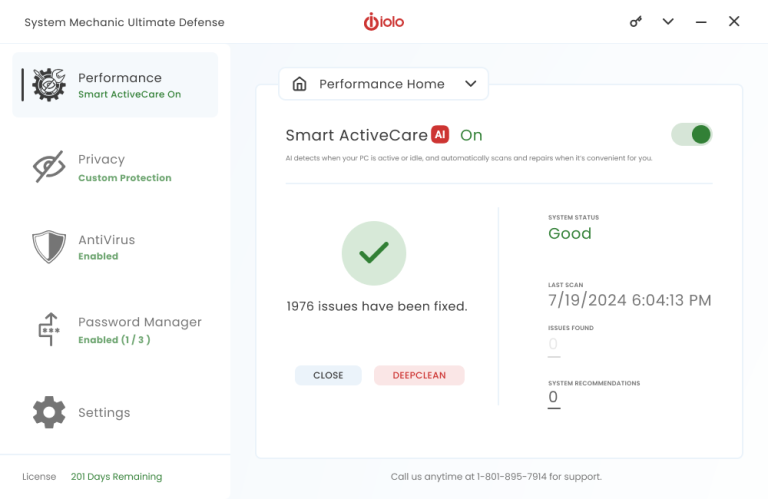
Advanced cleaning and repair removes more unsafe clutter and fixes more problems than ever before, going to work whenever your PC is idle.
Internet Cleanup
Delete temporary internet files for better responsiveness
Windows Cleanup
Delete Windows junk files to unleash speed
Memory Mechanic
Free up memory for better performance
NetBooster
Optimize settings to speed up internet connections
Registry Cleanup
Find and repair registry files to improve performance
Security Optimizer
Detect and resolve Windows security issues
Program Accelerator
Detect and resolve Windows security issues
Toolbox
Startup Optimizer
Speed up Windows startup time
Network Scanner
View external devices and connections
File Incinerator
Remove and destroy deleted files
Advanced Uninstaller
Easily remove installed programs
Process Scanner
Find memory-intensive background tasks
Deceptive Programs
Find and remove harmful software
AppPrioritizer
Prioritize speed and efficiency for the apps you use most
What is iolo's Whole Home License?
The Whole Home License® is iolo’s licensing policy that allows you to install and keep your software running on all of your compatible devices within the same home. Previously, users were allowed to install and license their iolo software simultaneously on a maximum of three PCs. Under the Whole Home License, a single activation key allows you to use your iolo software on all of your PCs, other than any PCs you use for business purposes.What you need to know about Whole Home Licensing
You, your spouse, and your relatives living within the same household may use the same license on any number of PCs that you own which are not used for business.























 Start Free Scan